PDF Import Hub
30 free digital PDF-to-Tally conversions monthly. No credit card needed.
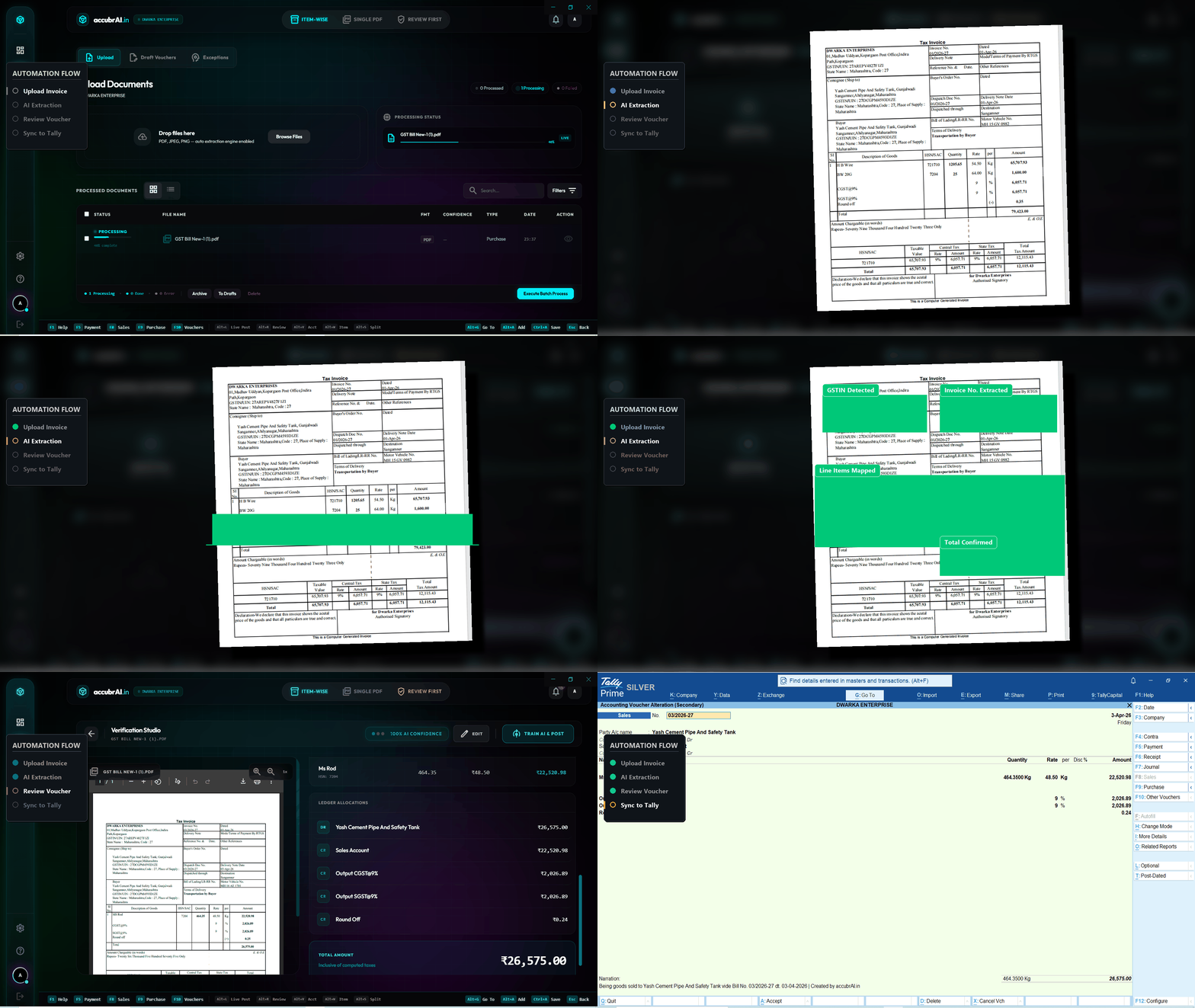
Start Importing →Don't trust claims, trust the UI. Here is exactly how our automation handles a scanned bill or PDF.
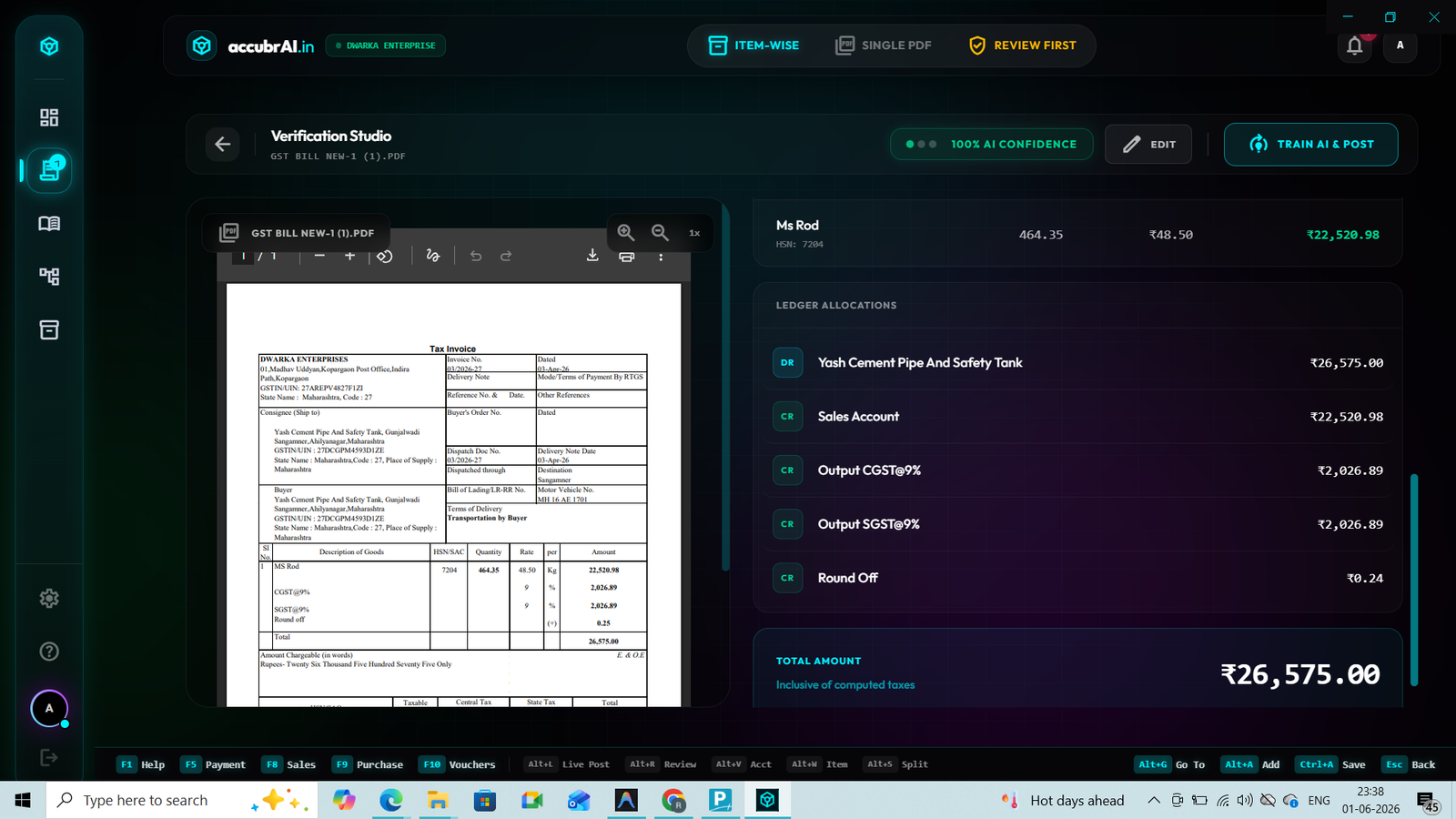
AI accurately reads mobile photo invoices and auto-fills party, items, and totals.
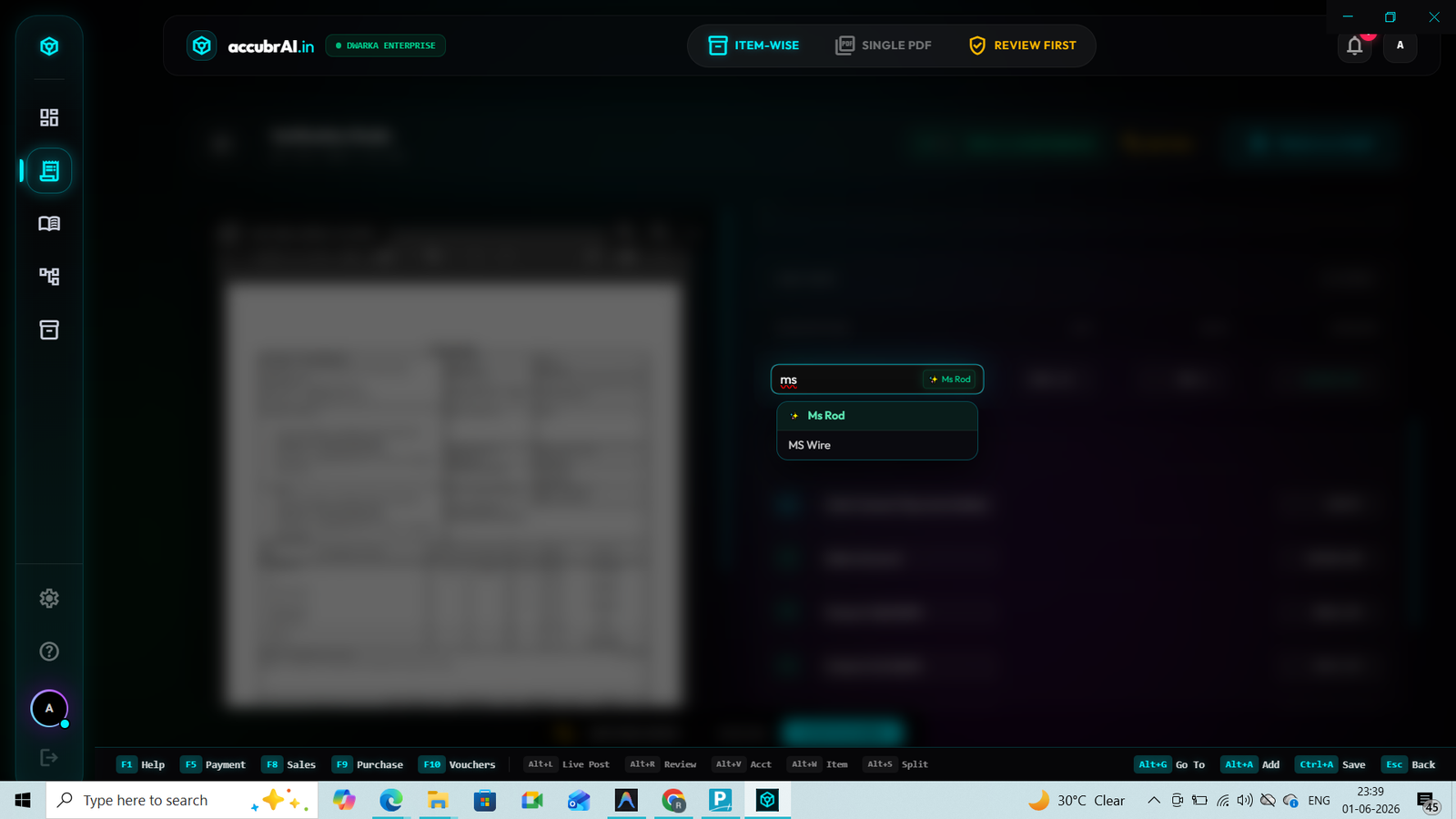
Matches extracted items and supplier names to your exact Tally Master ledgers automatically.
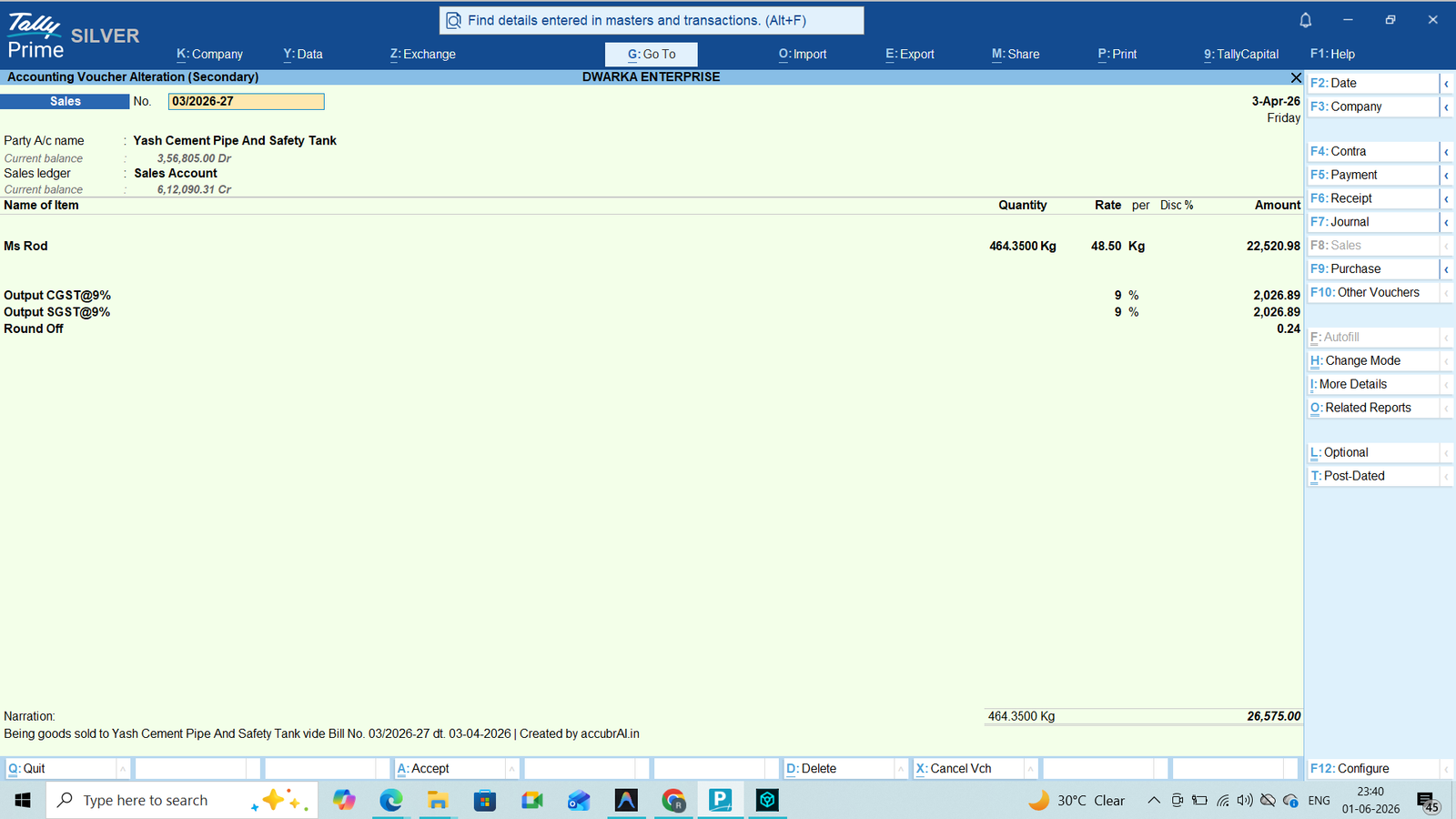
One click and the voucher is generated and posted directly into Tally ERP 9 / Prime.
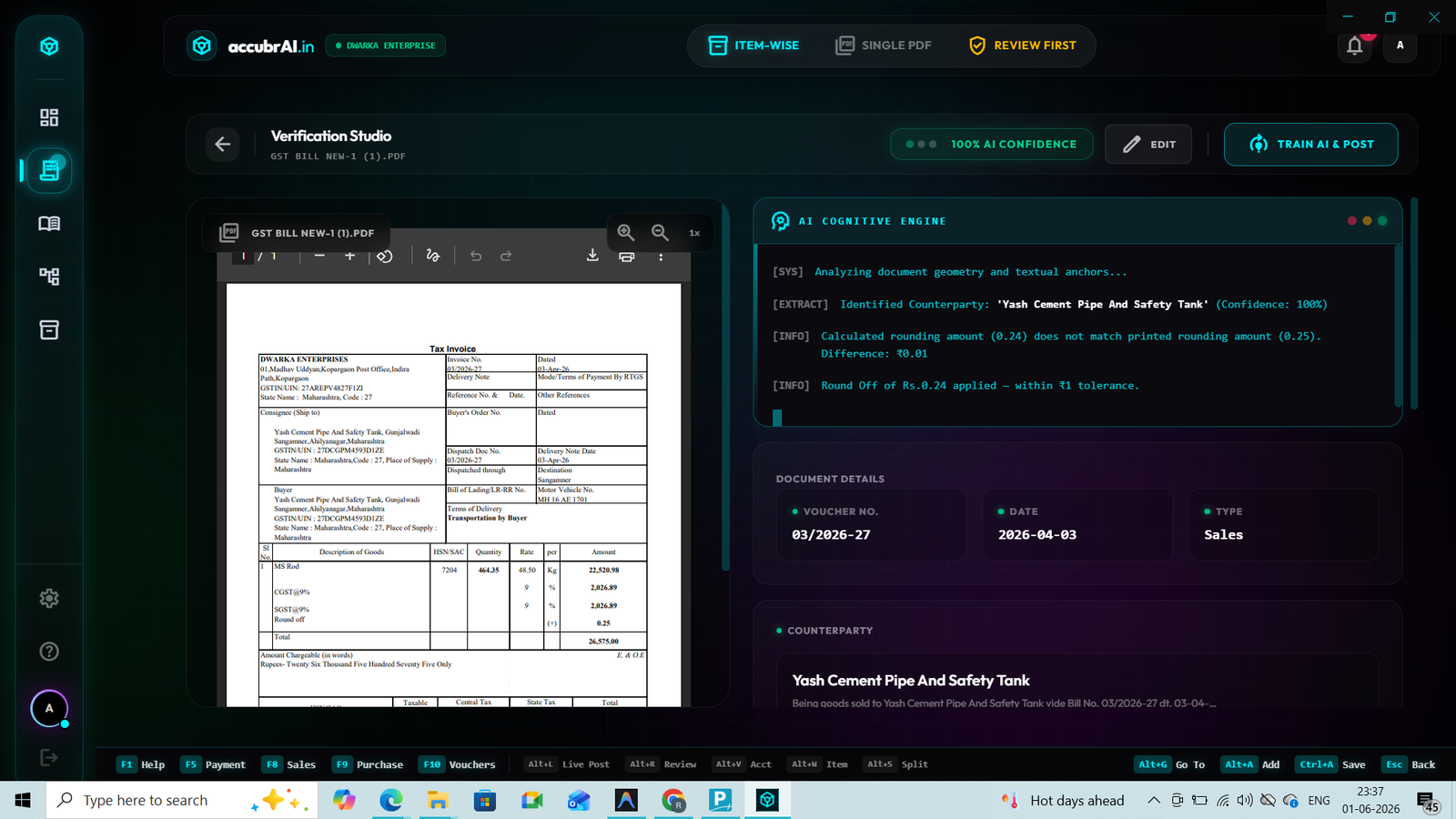
The AI Cognity Engine verifies the GSTIN format and auto-checks the math for CGST/SGST mismatches. Each and every calculation error is highlighted before creating the voucher.
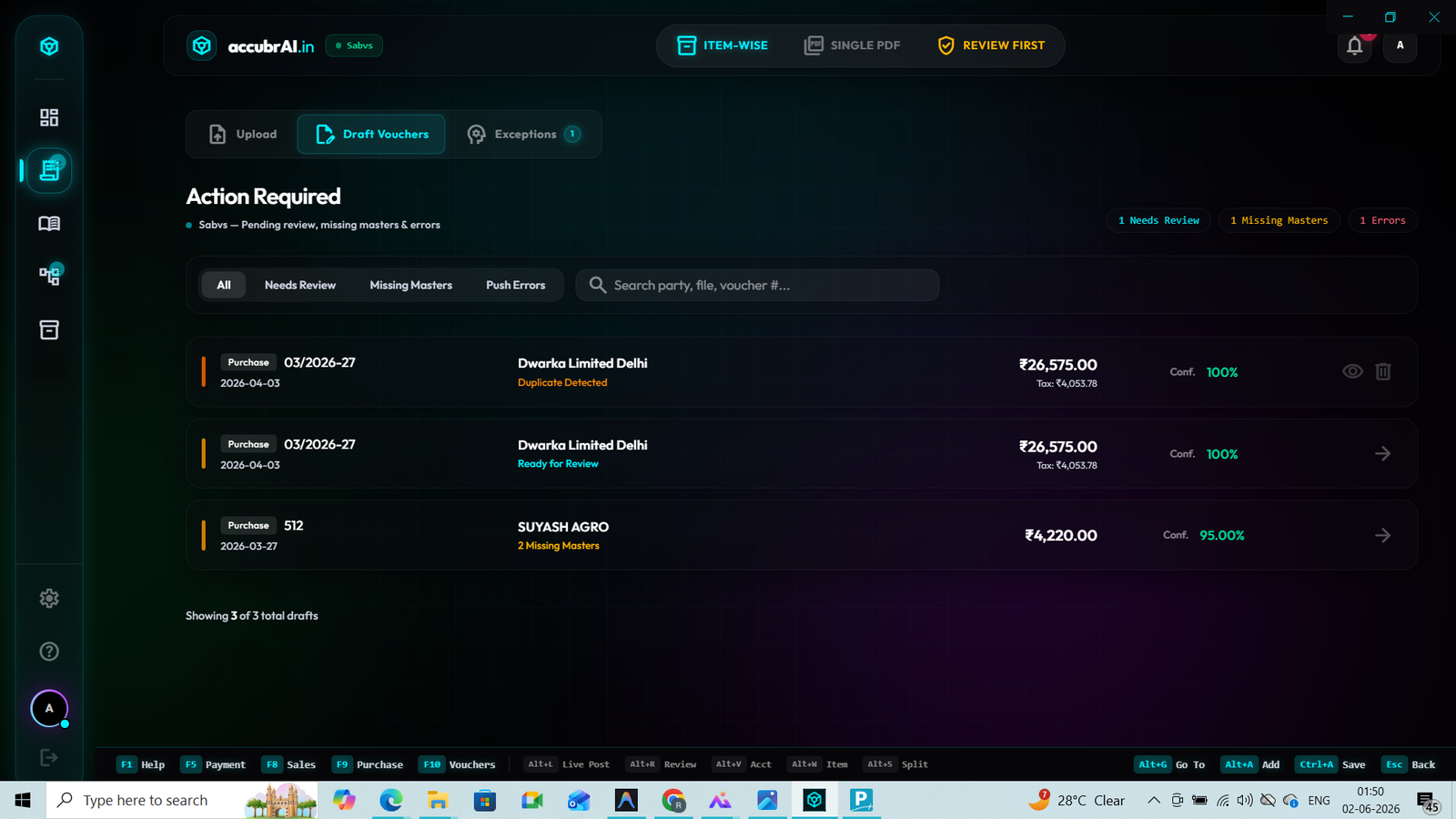
If you upload the same WhatsApp invoice twice, the system flags the invoice number and strictly stops the duplicate entry.
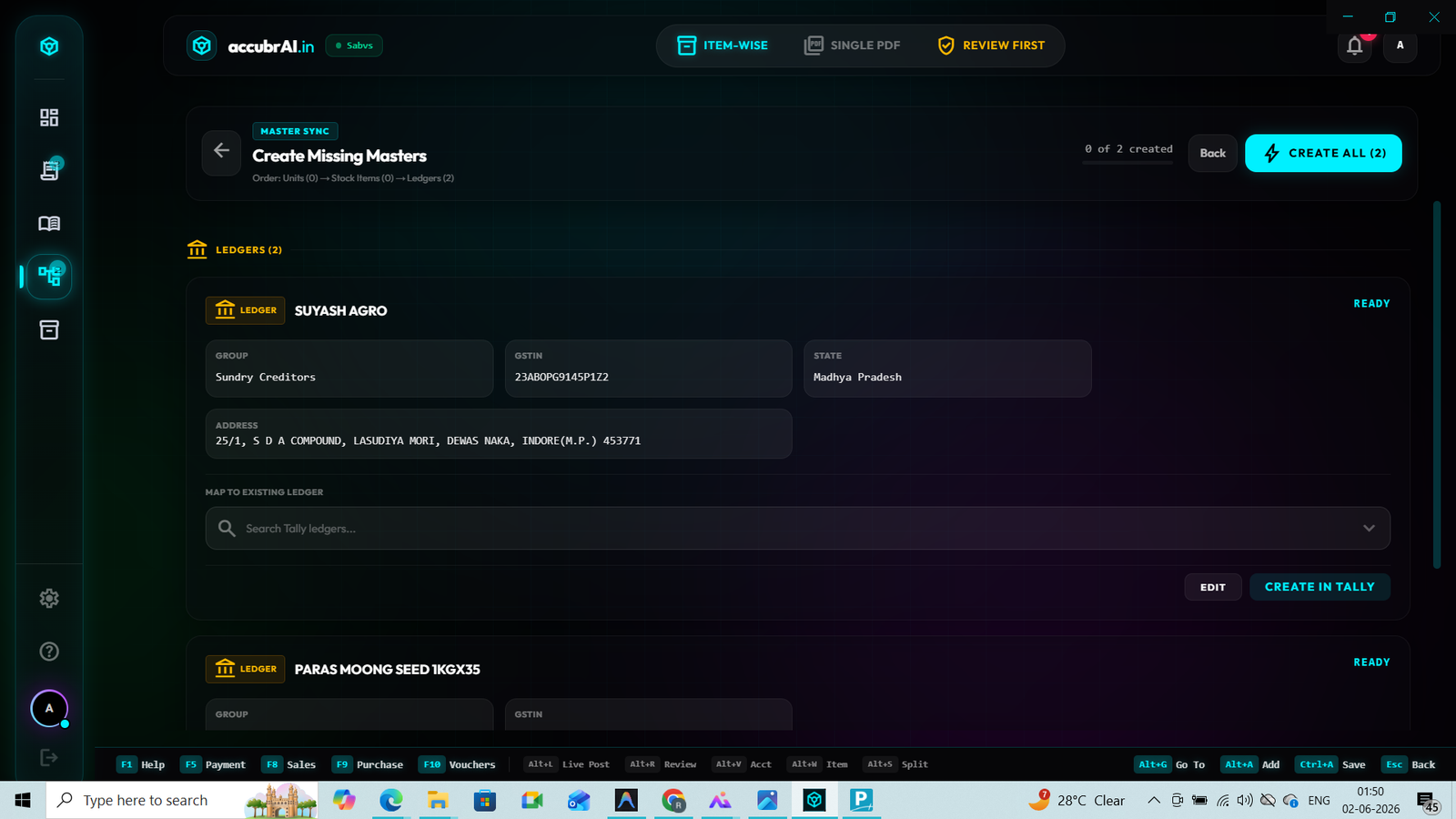
If an item or party ledger doesn't exist, instantly create a new Tally Master directly from our dashboard.
In the high-pressure environment of modern Indian corporate accounting, manual data entry is a luxury that businesses and CA firms can no longer afford. Every day, thousands of bank statements, purchase invoices, and sales bills are sent as PDFs. Manually typing these bills into Tally Prime or Tally ERP 9 is slow, expensive, and highly prone to human error. A single wrong keystroke can lead to mismatched GST input tax credits (ITC), unbalanced bank reconciliation statements (BRS), and compliance notices from the tax department.
This is where pdf to tally import software becomes a game-changer. By using an advanced pdf to tally converter, businesses can turn digital bank statements or scanned invoices into standard Tally XML format, allowing them to import hundreds of vouchers in under a minute. Instead of spending hours matching line items, your accounting team can focus on higher-value compliance, audit readiness, and cash-flow optimization.
However, not all converters are built the same. While simple tools can extract text, they often fail to map ledger accounts, compute tax splits, or handle complex banking narrations correctly. To help you choose the right solution, we have analysed the core technology driving the best platforms in the Indian market today.
Not all pdf to tally software are created equal. Understand where your tool stands.
These tools perform standard character recognition to pull plain text strings from a PDF. They lose the horizontal row alignment and vertical grid structure completely. You are forced to copy the raw text, paste it into Excel, and write complex formulas to create a layout that Tally can understand. This legacy method completely fails with a scan pdf to tally task where invoices are low-resolution, tilted, or contain multiple pages.
Template-based programs require you to manually draw boxes around the name, date, invoice number, and tax values for every unique vendor layout. While this works for standard invoices, it breaks completely if a vendor changes their invoice template even slightly (such as moving the logo or adjusting column widths). Managing thousands of active vendor templates is a heavy maintenance headache for growing enterprises.
The ultimate evolution in Tally entry automation. Powered by deep neural networks, our system reads any bank statement or vendor invoice format exactly like a human accountant. It detects rows, understands the context of columns, extracts ledger names, and accurately splits CGST, SGST, IGST, HSN codes, and round-offs without needing any template setups. This ensures **100% precision** on day one.
When selecting the best PDF to Tally software, professional accounting firms and enterprise CFOs look beyond basic data reading. The true challenge lies in the "Post-Extraction Logic" that translates unstructured text into clean double-entry accounting records. Below are the key technical layers you must evaluate:
Standard converters extract the party name exactly as written in the PDF. However, if your Tally ledger is named "Bharti Airtel Limited" but the bill displays "Airtel", a simple tool will crash or create duplicate accounts. Top-tier tools like accubrAI use **Neural Ledger Matching**. By cross-referencing your active Tally chart of accounts and validating vendor GSTIN numbers in real-time, the AI automatically maps transactions to the correct existing ledger with absolute safety. Link: Core Integration Guide.
During financial year-end or monthly GST filing deadlines, accountants face massive volumes of bills. A high-quality pdf to tally converter must support high-speed batch processing. Rather than uploading one invoice at a time, you should be able to drag and drop a folder of 500 invoices or multi-page bank PDFs. The system should process them in parallel threads, compiling them into a single consolidated XML download in less than 2 minutes. Explore our Scanning Automation Hub.
For GST compliance, a simple total amount entry is useless. The software must read individual invoice line items, recognize different GST tax rates (5%, 12%, 18%, 28%), separate CGST, SGST, IGST components, and extract item-level HSN/SAC codes. If there are rounding-off discrepancies (e.g. ₹0.43 adjustment), the engine must automatically route them to your "Round-Off Ledger" to ensure Tally vouchers are mathematically perfect.
Converting **bank statement PDF to Tally** requires a unique set of skills. Bank statements contain long, cluttered narration texts with UTR codes, UPI handles, cheque numbers, and short merchant names. An elite utility decodes these narrations, extracts the UTR number, maps it to the right customer/vendor, and auto-generates a payment or receipt voucher while preserving value dates. Check our Bank BRS Guide.
Follow this simple, professional workflow to convert and import your financial PDFs directly into Tally Prime or ERP 9 using accubrAI.
Download your digital bank statements directly from your bank's net-banking portal, or gather digital PDF invoices received from your suppliers.
Upload your files to the accubrAI dashboard. Our AI instantly begins scanning, running OCR on scanned files, and reading structured transaction details.
The AI will automatically map each transaction to your Tally ledger accounts. You can review maps, add HSN details, and confirm the auto-calculated tax components.
Click 'Export XML' and download your voucher packet. Open Tally, go to Import Data > Vouchers, select the file, and watch all entries push in 5 seconds!
Stuck with a Tally XML error? Here is how to fix common ledger and format issues instantly.
Why it happens: Tally requires exact character-by-character matching. If the XML contains a ledger named "HDFC Bank A/c" but your Tally ledger is named "HDFC Bank", the import will fail.
How to fix: Use accubrAI's contextual mapping screen before downloading the XML. Select your exact Tally ledger from the dropdown list. Our system remembers this choice, so future statements map automatically!
Why it happens: Low-cost OCR tools read files line-by-line. If a scan is tilted, blurry, or captured with a mobile camera under poor lighting, standard text-match fails.
How to fix: accubrAI utilizes standard banking-grade Neural Vision processing. Our AI processes the invoice *visually*—mapping pixels directly into data columns. Ensure your scanned image is at least 150 DPI for flawless visual mapping.
Why it happens: Tally imports XML data as fresh additions. If you import the same bank statement XML file twice, Tally will double-post every single entry without warning.
How to fix: Our advanced converter embeds unique `GUID` tracking tags inside each XML voucher header. When Tally reads the second file, it recognizes the unique transaction ID and automatically ignores duplicate vouchers.
| Capability | Standard PDF Converters | accubrAI Logic Suite |
|---|---|---|
| OCR Engine Type | Basic string-match (fails on blurry scans) | Vision-Neural OCR (99.9% accuracy) |
| Setup Time | Requires 15–20 mins drawing custom templates | 0 minutes. Fully automated setup |
| GST & Tax Split | Reads only total value (Manual tax matching) | Automated HSN extraction & multi-tax splits |
| Fuzzy Ledger Match | No ledger cross-referencing | Neural mapping matches aliases and names |
| Duplicate Defense | Creates double entries on import | Smart GUID injection blocks duplicates |
Tally is a localized database engine designed to process structured XML records. It has no native vision framework to parse unstructured visual formats like PDF or image files. accubrAI bridges this gap by reading the PDF, decoding the elements, and compiling them into clean, Tally-compliant XML records.
We support all major business voucher types. This includes Purchase Vouchers (with inventory item allocations), Sales Vouchers, Receipt and Payment Vouchers (for bank statements), Journal Vouchers, and Contra entries. Each voucher is fully compliant with standard Tally XML schema structures.
Yes. Security is our absolute top priority. We use banking-grade 256-bit SSL encryption to encrypt files in transit and at rest. Furthermore, our system is fully ISO 27001 certified and GDPR compliant. We never store or share your financial data—it is processed inside a secure sandbox and fully deleted after conversion.
Yes. Our Vision AI platform is designed to handle tough OCR challenges. It can process scanned PDFs, mobile screenshots, and photographs shared over WhatsApp. The neural engine automatically adjusts brightness, compensates for tilts, and accurately isolates characters.
accubrAI is engineered for speed. A typical 10-page bank statement containing hundreds of transactions is fully analyzed, mapped, and converted into an XML file in less than 30 seconds. Large batches of 100+ files are processed concurrently in under 2 minutes.
If an invoice has a rounding correction (for example, a total of ₹1,250.40 rounded to ₹1,250.00), the system detects the difference and automatically maps the ₹0.40 debit or credit to your pre-defined Round-Off Ledger in Tally, ensuring zero accounting mismatch warnings.